
OpenCode Browse Lets AI Coding Agents Control Your Signed-In Browser Tabs
OpenCode Browse is an MCP server plus Chromium extension for agent-driven real browsers. Agents drive background tabs via Playwright and hand control back for 2FA, logins, or payments. Works with Chrome, Edge, Brave, Arc, Vivaldi, Opera and Chromium family browsers.
Takeaways
- OpenCode Browse is an MCP server plus Chromium extension for agent-driven real browsers.
- Agents drive background tabs via Playwright and hand control back for 2FA, logins, or payments.
- Works with Chrome, Edge, Brave, Arc, Vivaldi, Opera and Chromium family browsers.
- Compatible with OpenCode, Claude Code, Cursor, Codex, Zed and other MCP clients.
- Features include screenshots, screen recordings, HAR network capture, and per-session site allowlists.
- Source is open on GitHub ; install via curl, npm, bun, or the extension.
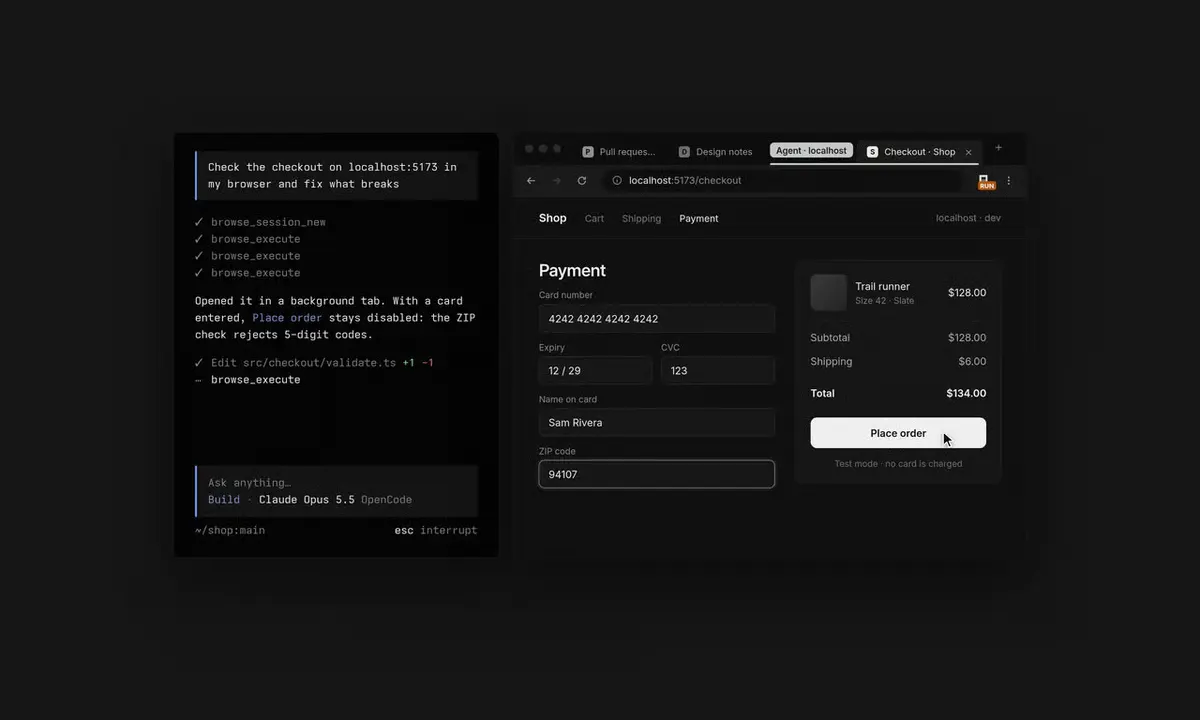
OpenCode has released OpenCode Browse , a tool that lets coding agents operate tabs in an existing Chromium browser profile. Playwright drives background tabs while retaining access to the profile’s active sessions, extensions, and open pages.
For developers, Browse reduces the authentication work involved in browser automation, including separate profiles, cookie persistence, repeated logins, and service-specific integrations. Sensitive steps such as reauthentication, two-factor prompts, and payments can return control to the user before the agent resumes.
Inside the browser bridge
Browse combines a Chromium extension with a Model Context Protocol server. MCP is a standard that allows AI clients to invoke external tools, while Playwright supplies the browser automation layer. A typical session moves through four steps:
- An MCP-compatible client sends a browser task.
- Browse opens a background tab or receives an existing tab through the extension.
- Playwright navigates, clicks, types, captures screenshots, or records network activity.
- Browse pauses for designated sensitive steps, then continues after the user selects Continue .
OpenCode lists support for OpenCode, Claude Code, Cursor, Codex, Zed, and other MCP clients. Compatible browsers include Chrome, Edge, Brave, Arc, Helium, Vivaldi, Opera, and Chromium. Firefox support is not listed.
Four ways to install
Installing the Chrome extension starts a guided setup, and the command-line installer offers separate paths for common shells and package managers.
| Environment | Command |
|---|---|
| macOS or Linux | curl -fsSL https://opencode.ai/browse/install | bash |
| PowerShell | irm https://opencode.ai/browse/install.ps1 | iex |
| npm | npm install -g @opencode/browse && browse install |
| Bun | bun add -g @opencode/browse && browse install |
The source on GitHub is available for inspection, and the extension is distributed through the Chrome Web Store. Browse reuses existing website sessions, removing the need to create target-site API keys for browser-only workflows. Credentials required by the chosen agent or model provider remain separate.
Why existing sessions matter
Authenticated browser automation often requires developers to maintain cookies, seed test accounts, handle single sign-on, and recover from two-factor challenges. Browse gives an agent access to the same authenticated interface already available to the user, making it suited to local and supervised tasks that resist conventional scripting.
| Approach | How it runs | Best fit | Operational cost |
|---|---|---|---|
| Headless Playwright or Puppeteer | Uses a separate browser process or profile | Repeatable CI jobs and isolated tests | Requires authentication state, secrets, or login automation |
| Chrome DevTools integrations | Attaches to a running Chromium instance | Inspection and local browser control | Debug configuration and tab orchestration vary by implementation |
| Extension and MCP bridge | Coordinates existing tabs through a browser extension | Interactive, authenticated workflows | Grants the agent meaningful authority inside the active profile |
Controls built for live tabs
- Background tab groups: Agent-created tabs remain collapsed and separate from the active browsing window.
- Lend-a-tab: The toolbar button assigns an existing tab to the agent, allowing automation to begin partway through a workflow.
- Capture tools: Browse can create screenshots, screen recordings, and HTTP Archive files containing network requests and timing data.
- Session allowlists: Access can be restricted to named sites, reducing the set of pages available during a task.
- Human handoff: Selected steps can pause automation and return the tab for direct user input.
Workflows behind the login wall
Browse is most useful when a task depends on an authenticated interface and lacks a stable API or command-line tool. Common examples include:
- Reproducing a frontend bug on a staging site protected by single sign-on.
- Verifying a deployment end to end as a signed-in user.
- Completing long forms that require occasional review or private input.
- Reviewing transaction dashboards or other read-only account data within a narrow allowlist.
- Running Lighthouse against an open page and collecting screenshots, recordings, or network traces for regression analysis.
Access needs tight boundaries
Granting an agent control over a signed-in browser profile exposes actions and data available to that user, including account settings, private pages, and potentially destructive controls. Allowlists constrain navigation, though prompt injection can still appear within an approved site and influence the agent’s behavior.
- Limit each session to the smallest practical set of domains.
- Use a dedicated, low-privilege browser profile for unfamiliar or high-risk sites.
- Keep payments, account changes, deletions, and other irreversible actions under direct human control.
- Treat screenshots, recordings, and HAR files as sensitive because they may contain URLs, response data, and authentication headers.
- Review extension permissions and test read-only workflows before granting broader access.
Local, supervised workflows that depend on existing login state gain the most from Browse’s extension and MCP design, especially when authentication setup dominates the task. Isolated profiles and deterministic scripts remain better suited to unattended CI jobs and high-risk transactions.
Reporting is indexed from AlphaSignal. Rights remain with the original publisher and cited sources.
Read original report

