
Social posts can make Jev sound like “a faster, cheaper LLM that never hallucinates.” That catchy summary gets the important part backwards. Jev’s value is not that it generates better prose; its primary task is not generating prose at all.
Jev in one sentence
Jev is TypeSafe AI’s probabilistic, structured decision model. Give it a text state and a set of clearly bounded questions. It returns a selected option, a score, or the probability of “yes”—not a paragraph that your application has to parse again. TypeSafe describes the pattern as unstructured state in, typed probabilistic decisions out.
Consider a support ticket. A chat model might say: “The customer seems frustrated, this may be a billing issue, and it should probably be handled soon.” That sounds natural to a person but leaves software with more work: Is it billing? How frustrated? Should the ticket be escalated? An engineer still needs parsers, rules, and fallbacks.
Jev instead fills in a decision form your application defined in advance:
- Category | billing | 0.91 probability
- Urgency | 8 / 10 | high confidence
- Escalate? | 0.87 | probability of yes
This is a difference in system boundaries, not writing style. One model hides its decision in a sentence; the other makes the decision a value software can consume. For an agent making hundreds of thousands of routing, filtering, ranking, and safety decisions, removing one “guess the answer from the prose” step can matter more than making the final response sound smarter.
Keep the capability boundary clear Jev is neither a browser controller nor a vision model. Ego, Playwright, or another agent tool fetches pages, reads screenshots, clicks, and types. Jev can read a text state those tools prepare and choose among described actions. Jev 1.13 is text-only; it does not directly see images, hear audio, or understand video.
Where it came from: “System One” is more than a speed slogan
TypeSafe AI introduced Jev on September 15, 2026, calling it the first publicly available System One Model. The name borrows Daniel Kahneman’s popular description of System 1 thinking: fast, intuitive, and almost automatic. “Jev” nods to 19th-century economist William Stanley Jevons and the Jevons paradox: efficiency gains do not always reduce total resource use; cheaper use can make consumption rise instead.
There is a product thesis in that naming. When one decision gets cheap enough, developers may not just replace an existing LLM request. They may add model judgments at small points where a call used to be too expensive: Is this email worth interrupting someone for? Is this search result relevant? Which button is most likely to advance a workflow? Does this log entry need a human?
TypeSafe calls Jev’s training approach RLCD, or Reinforcement Learning for Calibrated Decisions. Public material does not reveal enough to reproduce the training independently, so the name alone is not a peer-reviewed account of the method. What we can inspect is the product interface: outputs are probability distributions rather than free text; multiple independent questions can share one state; and developers can set thresholds for automation, review, or stopping.
TypeSafe co-founder Diogo Almeida worked on early RLHF and InstructGPT efforts. That background helps explain the team’s interest in how model outputs enter software, but a résumé does not establish model quality. Whether Jev fits a business still depends on that business’s data, error costs, and thresholds.
The core is not a prompt; it is three decision primitives
When you first read the Jev docs, pause over how the interface constrains a question. The main primitives are Choice, Score, and Noul. They do not cover every form of expression. That constraint is part of the reliability story.
Choice: select one known candidate
Choice is for routing and classification. Supply options such as refund, billing, technical, and other; the result includes the selected option, probabilities for candidates, and confidence. The documented per-question limit is 255 candidates. For a larger set, use Score to narrow it down and then run Choice on the shortlist.
Choice answers “which one?” It should not quietly combine several criteria. “Pick the most urgent, easiest-to-solve, highest-value ticket” mixes three goals. Ask separately about urgency, resolution difficulty, and customer value, then let code calculate the ordering. It may look less clever, but it is easier to test and diagnose.
Score: rate something on a discrete scale
Score returns a value in a range you define, plus a probability distribution over scores and confidence. It can assess relevance, risk, quality, sentiment intensity, or priority. Make the scale interpretable: say what 0, 5, and 10 mean, and how intermediate values differ, instead of asking whether something is “good.”
A score can look more precise than a label and invite false precision. Does a business action really differ between 8 and 9? If not, downstream code should not treat those values as different worlds. Choose the number of action bands first; design the scale second.
Noul: return the probability of “yes”
Noul is the smallest unit. Ask whether content contains personal information, whether a user explicitly requested a refund, or whether a result meets an intent. It returns a probability from 0 to 1 without a separate confidence field. The caller chooses the threshold: 0.6 might trigger a harmless interface hint, but it is nowhere near enough to suspend an account, charge money, or delete data.
The practical division is simple: the model handles uncertainty; code handles policy. “There is an 87% probability this is fraud” is a model judgment. “Auto-block above 95%, send 80–95% to a human queue” is business policy. Keeping them separate lets a team adjust its risk tolerance without retraining the model.
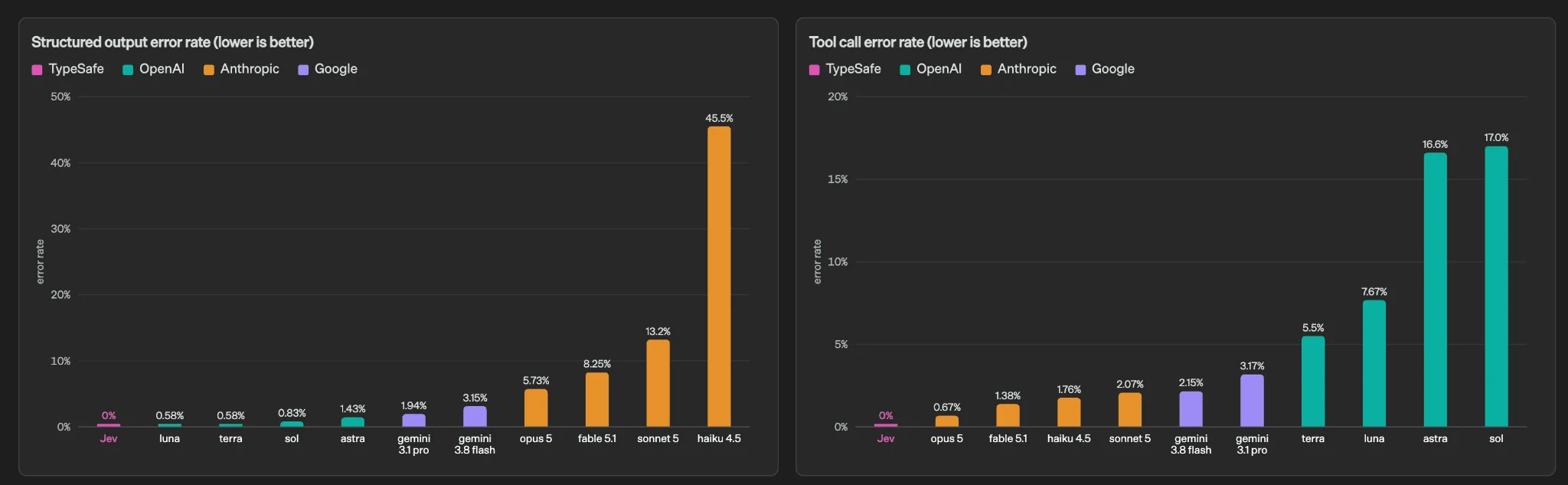
TypeSafe uses this chart to illustrate failure modes in “generate text, then constrain it.” It is a vendor evaluation, not an independent replication.
What a call looks like: state, questions, probabilities, and code
A request has a shared state, a model name, and a set of questions. The state is the evidence each question reads: an email, support ticket, search results, tool trace, or a compact accessibility tree. Questions are evaluated independently against that same state; a later question does not automatically depend on an earlier answer.
POST https://api.typesafe.ai/v1/systemone

{
  "model": "jev-latest",
  "state": "Customer says the invoice is duplicated and asks for a refund...",
  "questions": [
    {
      "type": "choice",
      "question": "Which team should own this ticket?",
      "options": ["billing", "support", "security", "other"]
    },
    {
      "type": "score",
      "question": "How urgent is this request?",
      "min": 0,
      "max": 10
    },
    {
      "type": "noul",
      "question": "Does the customer explicitly request a refund?"
    }
  ]
}
This shape can replace a long waterfall of rules, but remember the independence constraint. If question three must depend on question one’s answer, split the work into calls—or ask Jev for base judgments and combine them in code.
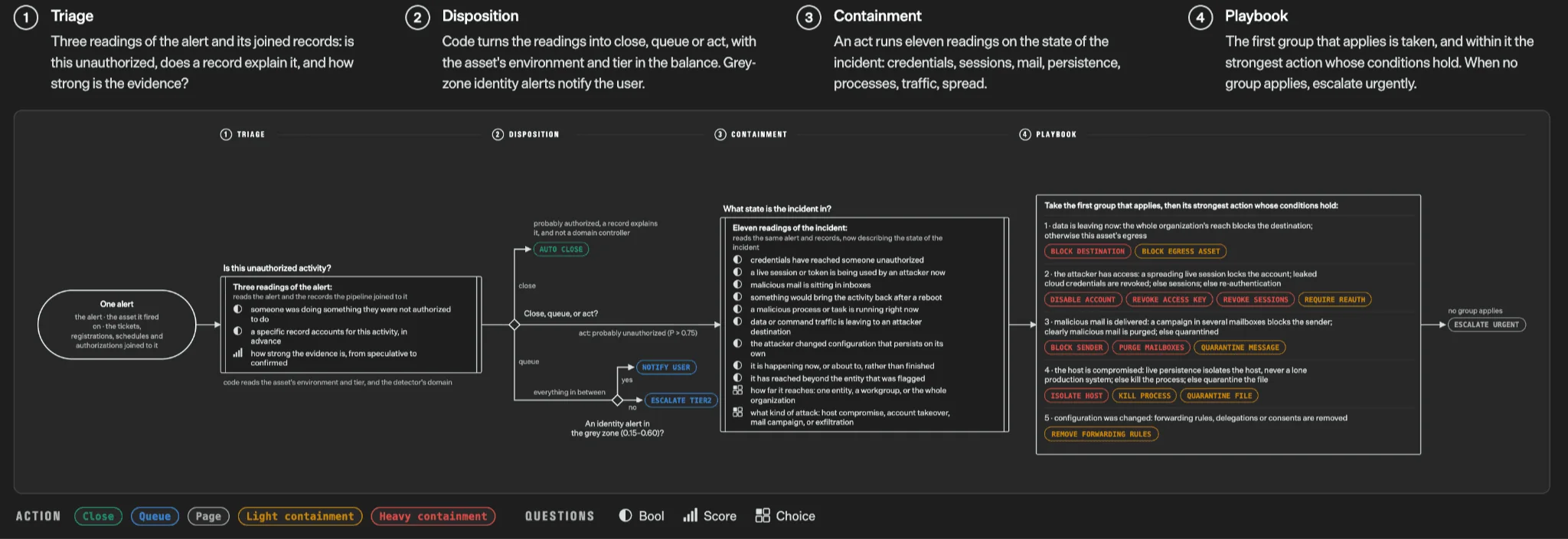
A production-minded pattern: the model answers atomic questions; code combines them under explicit policy. Source: TypeSafe’s launch article.
The useful lesson is the division of responsibility. A workflow does not become one “magic prompt.” Jev handles ambiguous judgments suited to it; Boolean logic, thresholds, permissions, and side effects stay in auditable code.
How fast and inexpensive is it? Separate three kinds of evidence
Numbers helped Jev spread. At the time of writing, TypeSafe’s model page lists Jev 1.13 input at $0.042 per million tokens, with no output charge, and advertises up to 250,000 tokens per second and 1,200 requests per minute. Its launch post gives a typical latency range of 70–500 ms and claims Jev can be 40–200 times faster than traditional reasoning models on tasks suited to System One.
Read these claims in three layers:
- Product specifications: price, context length, and rate limits are current purchasing terms controlled by the provider. Recheck the model page before launch.
- Vendor evaluations: TypeSafe reports up to about 193.6× speed and 444.6× cost advantages across four internal workflows. The company labels these as upper-bound results and notes that reference labels average Astra and Fable outputs, a design that may favor its approach.
- Independent observations: useful for a second perspective, but current tests cover limited tasks, languages, and sample sizes. One result does not generalize to every business.
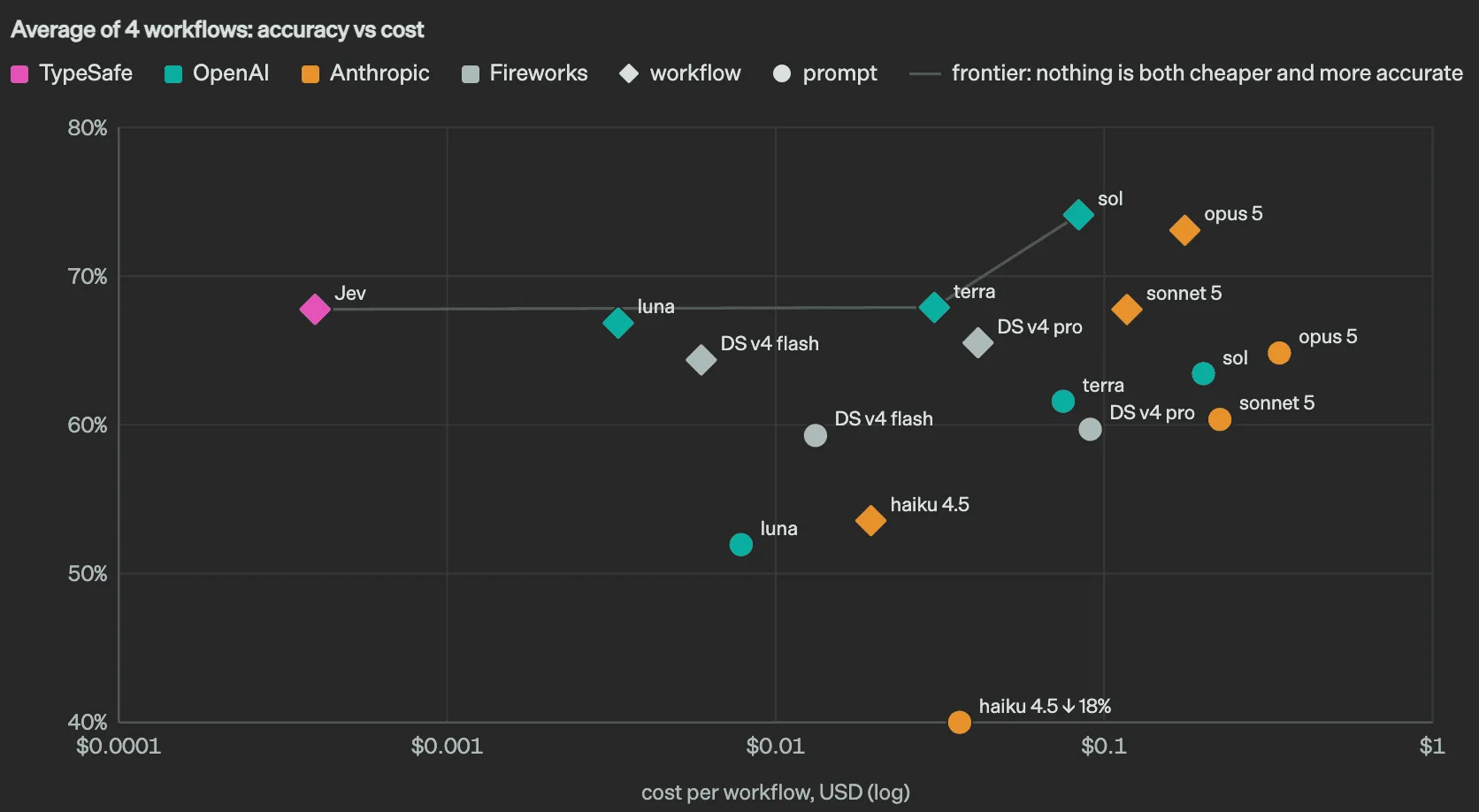
TypeSafe’s accuracy-cost chart shows what the vendor is optimizing for. It does not replace replay tests on your production examples.
What one preregistered independent test found
PrimeLine designed three preregistered tests and ran four Jev versions across two real tasks: about 9,750 API calls for $0.38. In one test summarized as 2,600 examples, predictions with confidence of at least 0.9 were about 92% accurate and covered roughly 73% of the sample. Below 0.8 confidence, results were close to a coin flip.
The point is not the flattering “92%.” It is the plausible abstention pattern: automate high-confidence examples and route uncertain ones to a stronger model or person. Calibration error also varied by primitive in the report: about 0.012 for Noul, 0.086 for Choice, and 0.254 for Score. The samples are not fully comparable, but one global confidence threshold may not work for every question type.
What an early Norwegian-language trial adds
Emil Lindfors tried Jev on 24 Norwegian consultation documents. In a published example the model missed the reference label, though its probabilities showed hesitation. A call with 11 questions and about 4,995 input tokens took around 0.31 seconds. That feels like a real development result: impressive latency, and an error that a typed interface cannot make disappear.
Two context caveats matter. TypeSafe lists a 64k total context for Jev 1.13, with a 32k combined limit for state plus the longest question; OpenRouter lists a 32k context. Providers may count differently, so verify the actual endpoint. TypeSafe also says English is Jev’s strongest language. Chinese, Japanese, Korean, and other languages may work with varying stability. Evaluate thresholds on your own language and data.
What people build with Jev
Across public projects and demos, the pattern is rarely “build a Jev chatbot.” Instead, Jev appears in decision gaps that used to need lots of prompts, small-model calls, or brittle rules. Our Jev use-case directory collects 202 public examples.
1. Agent routing: choose the next tool
An agent may need to search, write code, query a database, or ask a follow-up. A small LLM returning JSON and keyword rules are common approaches. Jev Choice can select a tool; Score can estimate whether an expensive model is warranted; Noul can ask whether there is enough information to continue. High-frequency routing may happen more often than the final response.
2. Search and retrieval: choose sources and rerank
The open-source project jev-search shows a restrained approach: Jev selects a source, time range, and search strategy, then reranks results for relevance without writing the answer. Search needs many small judgments, not necessarily a paragraph at every step.
3. Browser automation: choose from candidate actions
A browser agent often reaches the point where it understands the page but must decide what to click. Compress the accessibility tree, button labels, and task into text state; ask Jev to choose an action. The browser still observes and clicks. Jev chooses among text-described candidates.
4. Safety and observability: label a trace
An agent trace might include dozens of tool calls. The practical questions are whether it overstepped permissions, exposed sensitive data, or failed because of its plan, a tool, or the environment. Monitoring eventually needs labels, scores, and escalation decisions. Jev’s output fits those downstream jobs better than a long generated review.
5. Batch content and business data
Product categorization, review intent, lead quality, refund reasons, invoice anomalies, and content moderation share a structure: many inputs, modest value per item, tiered error costs, and a fairly stable output set. At a hundred items a day, almost any model can cope. At a million, latency and per-token cost can change the architecture.
6. Games, robotics, and real-time interaction
TypeSafe’s Doom demo is sometimes retold as “Jev sees the screen and plays.” The stated input is structured text, not pixels. Jev chooses an action from a description of health, ammo, enemies, and surroundings; the game controller executes it. That demonstrates low-latency decisions, not visual understanding. Robotics can use a similar high-level action selector, but perception, motor control, and safety constraints remain separate.
7. A useful counterexample: generating prose with Choice
The community project jev-llm experiments with repeatedly choosing the next token. It is interesting partly because it shows what not to optimize for. A screwdriver can hammer in a nail, but that does not make it the right tool. For writing, summaries, explanations, and code, use a generative model.
Structured output is not the same as being right
Jev will not unexpectedly return Markdown where a number belongs. That solves output-format reliability; it does not guarantee semantic correctness. If the state omits key evidence, the question is vague, or options overlap, Jev can still choose incorrectly—and confidently. Types guarantee a box’s shape, not the truth of what is inside.
TypeSafe’s jaggedness documentation calls out limitations worth keeping nearby:
- Literal interpretation: sarcasm, implied relationships, complex common sense, and indirect language can be unreliable.
- Math and counting: exact arithmetic, totals, and date comparisons belong in code.
- Noise in long states: unfiltered documents can bury relevant evidence.
- Conflicting criteria: asking for something safer, cheaper, and more creative at once makes the output hard to interpret.
- Adversarial content: prompt injection and deliberately confusing state still need defenses.
- Complex structures: Jev does not enforce nested JSON relations, cross-field constraints, or database invariants; validate those in code.
- Open-ended generation: it was not designed for long-form writing, summaries, explanations, conversation, or code generation.
There is also a versioning risk. jev-latest moves when the provider upgrades it. That can be convenient for ordinary classification. If an automated action depends on a calibrated threshold, pin a version such as jev-1.13.0 and replay your data before upgrading. A probability moving from 0.89 to 0.91 looks small but may cross a production threshold and change what users experience.
Do not automate high-stakes decisions from one score Medical diagnosis, legal conclusions, credit, hiring rejection, account suspension, payments, and data deletion require hard rules, access controls, audit logs, and appropriate human review—even when model confidence looks high.
The safest production move is not “replace everything”
If an LLM workflow already works, do not start by switching every call to Jev. Find one decision point that is frequent, has a short bounded output, clear candidates, and measurable errors: whether a search result is relevant, which queue owns a ticket, or whether a tool call looks abnormal. Replaying ten thousand historical examples will settle the question faster than debating a demo.
Build a three-lane decision path
- High confidence, low risk: act automatically, such as tagging an internal document.
- Medium confidence: send the case to a stronger generative model or retrieve more evidence and ask again.
- Low confidence or high risk: send it to a human queue; do not let the system pretend to know.
Do not copy thresholds from another blog. Measure precision, coverage, false-positive cost, and false-negative cost for your task. A mistaken content recommendation may cause one bad click. A mistaken safety block can stop someone from working. Even the same Noul probability should lead to different policies in those settings.
Keep the whole decision record
Log the model and question versions, a traceable state reference, candidate set, full probability distribution, threshold, and action taken. Saving only billing loses the important context: was billing 0.91 versus 0.05, or 0.36 versus 0.34?
Leave deterministic work to code
Adding amounts, comparing dates, checking permissions, validating state machines, and enforcing uniqueness do not require a neural model. Use Jev at fuzzy boundaries that are hard to express as rules, rather than taking over work code already handles exactly. A mature Jev system is not “all AI”: retrieval, cleaning, model judgments, ordinary conditionals, enums, and validators work together.
Watch for drift from longer states
Cheap inference tempts teams to pass more context. Lower token cost does not make attention free. Filter 200 search results to 30 before asking Jev; send visible controls and nearby text instead of an entire page DOM. Good preprocessing determines whether extra calls help.
Getting started: ask a better question in the Playground
Open the TypeSafe Playground and try the three primitives on a dozen real examples. Do not begin with one giant prompt meant to cover every case. Write a question, inspect the probability distribution, then challenge it with missing information, overlapping options, sarcasm, long noisy context, colloquial language, and typos. You want to learn where the model hesitates, not only how it handles the easy examples.
You can call https://api.typesafe.ai/v1/systemone directly using jev-latest or a pinned version. TypeSafe also offers a Python SDK:
pip install typesafe-sdkFor Codex, Claude Code, or another agent that supports skills, TypeSafe maintains an official skill:
npx skills add typesafe-ai/skills --skill typesafe-aiThe skill does not magically hand control of the agent to Jev. It gives the agent reusable instructions for structuring state, choosing a primitive, and reading results when a task calls for classification, scoring, or a yes/no judgment. Your application still decides whether to call Jev, what data to send, and which thresholds to use.
Quickstart, API, and Playground
For ideas, browse the Jev use-case directory. It links 202 public examples to their authors and original posts. Look for the decision gap where someone placed Jev, then find a similarly narrow, repeated, expensive step in your own product.
Frequently asked questions
Is Jev a large language model?
Jev is a neural model for probabilistic, typed decisions. It returns choices, scores, or yes-probabilities rather than composing open-ended text.
Can Jev control a browser?
No. A browser tool reads pages and performs clicks or typing. Jev can choose among text descriptions of candidate actions.
Does Jev understand images, audio, or video?
Jev 1.13 is text-only. Convert media to a useful text state with OCR, transcription, or another multimodal system first.
Is confidence the same as accuracy?
No. Confidence describes the model’s probability distribution. Calibration depends on the task, wording, language, and data; measure it on your own examples.
Can Jev replace every LLM call?
No. It suits frequent, bounded decisions. Writing, explanation, summarization, and code generation remain generative tasks.
Sources
Official documentation is used for interface details, model versions, and limitations. Vendor performance numbers are identified as vendor evaluations; independent tests provide context without turning a single experiment into a universal claim.
- TypeSafe: Introducing System One Models and Jev — launch, architecture, and vendor evaluations
- TypeSafe Docs: Introduction — Choice, Score, Noul, and parallel questions
- TypeSafe Docs: Models — Jev 1.13 specifications, pricing, languages, and data policy
- TypeSafe Docs: Jev 1.13 Jaggedness — known limitations
- TypeSafe Docs: Confidence — interpreting confidence and routing risk
- TypeSafe Workflow Evals — four vendor workflow evaluations
- PrimeLine: A Pre-Registered Test of TypeSafe Jev — independent preregistered test
- Emil Lindfors: A First Look at TypeSafe’s Jev — early Norwegian-language trial
- DataCamp: System One Models and Jev — third-party overview and benchmark caveats
- Awesome Jev / TypeSafe — community project index